Industries
Property management and real estate
Maintenance requests triaged, vendors tracked and owners kept up to date.
Walk us through a job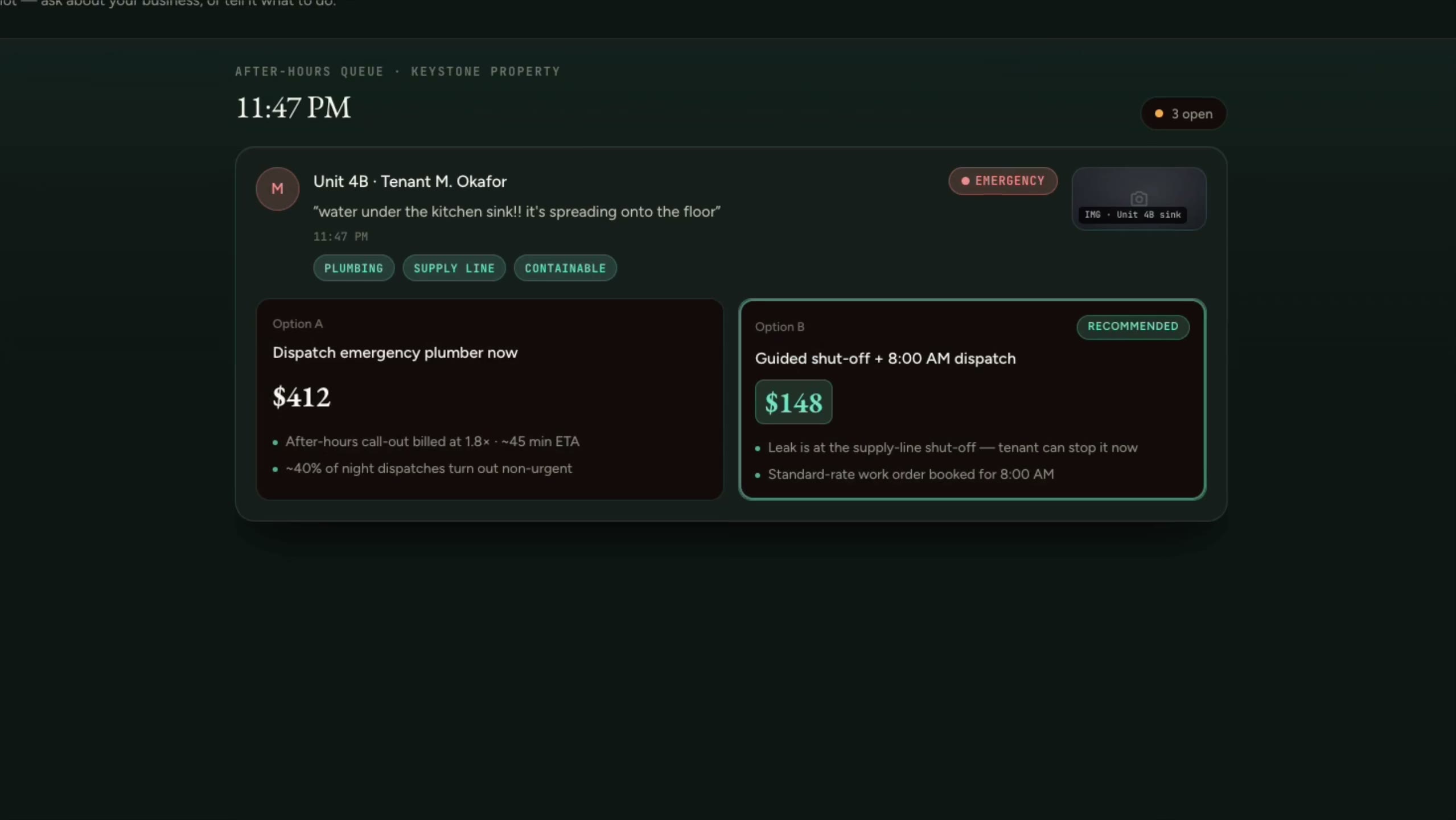
Keystone, property management (fictional company)
Overnight maintenance requests are sorted by urgency, so only the real emergency gets an after-hours call-out.
The companies are fictional. Every clip is a real screen recording of the same staged product, not a mockup.
How it actually runs
Property managers run on Yardi, Buildium, AppFolio or Rent Manager, with maintenance requests arriving through the portal, by email, by text and by phone at every hour. Vendors are dispatched by phone, owners get monthly statements, and the after-hours line decides whether a leak is an emergency.
Built for
- Residential property managers
- Strata and condo management
- Commercial property managers
- Brokerages and leasing teams
Sound familiar?
- After-hours calls wake someone up for problems that could wait until morning.
- Requests come in every possible way, and some get lost.
- Owners want updates we don’t have time to write.
- We pay vendor invoices without proof the work was done.
A job, start to finish
The system does the chasing. A person decides.
Every step splits the two. The copying, reminding and drafting move to the system. Prices, approvals and anything sent in your name stay with your team.
- 01
Request comes in
The system does
- Takes the request with photos through the portal, text, email or phone
- Asks the questions that separate an emergency from a routine fix
- Creates the work order against the unit
A person decides
Your manager sets the emergency rules and makes the call on anything unclear.
- 02
Vendor and access
The system does
- Suggests a vendor from your approved list
- Arranges access with the tenant
- Checks the vendor’s insurance and WCB clearance are current
A person decides
Your manager approves the vendor and any spend above your limit.
- 03
Work done
The system does
- Collects completion photos and the invoice from the vendor
- Matches the invoice against the work order
- Lets the tenant know the work is finished
A person decides
Your manager confirms the work before the invoice is paid.
- 04
Owner reporting
The system does
- Drafts each owner’s monthly update from the work orders and statements
- Flags recurring issues by unit or building
- Reminds you of inspections, renewals and certificate dates
A person decides
Your manager approves every owner update before it’s sent.
What we’d build
Where we’d start
Each one links to the service behind it.
After-hours triage
Night calls and messages answered, sorted by urgency against your rules, with only real emergencies sent to the on-call person.
Voice agents and call answeringTenant and owner portals
Tenants report and follow requests. Owners see work orders, photos and statements for their own properties only.
Client portalsVendor compliance
Insurance and WCB clearance tracked for every vendor, with a reminder before anything lapses.
Workflow automationOwner updates, drafted
Monthly owner updates drafted from work orders and statements, approved by your manager.
AI drafting with approvalInvoices checked against work orders
Vendor invoices read and matched to the work order and completion photos before payment.
Document and inbox processingAnswers from bylaws and leases
A knowledge assistant over your bylaws, lease templates and procedures, with the source clause shown.
Knowledge assistants for your team
Software you probably run
- Yardi
- Buildium
- AppFolio
- Rent Manager
- QuickBooks Online
- Microsoft 365
- Google Workspace
We connect to what you have. Names only; we aren’t partners of any of them.
The line we hold
What stays with you
- Decisions on tenancies, rent and legal notices stay with your managers.
- Your obligations under your province’s tenancy rules stay yours. We build to your policy.
And in every industry, AI never does these alone:
- Move money, or promise it
- Send the first message to anyone in your name
- Set a price or a quote
- Make a legal commitment
- Answer a complaint
- Delete records or make bulk changes
- Make an exception to your own rules
Walk us through a typical job.
Five short steps. We’ll tell you honestly where a system would help, and where it wouldn’t.
Start a project