Industries
Construction and renovation
From the first call to holdback release, with the paperwork kept straight.
Walk us through a job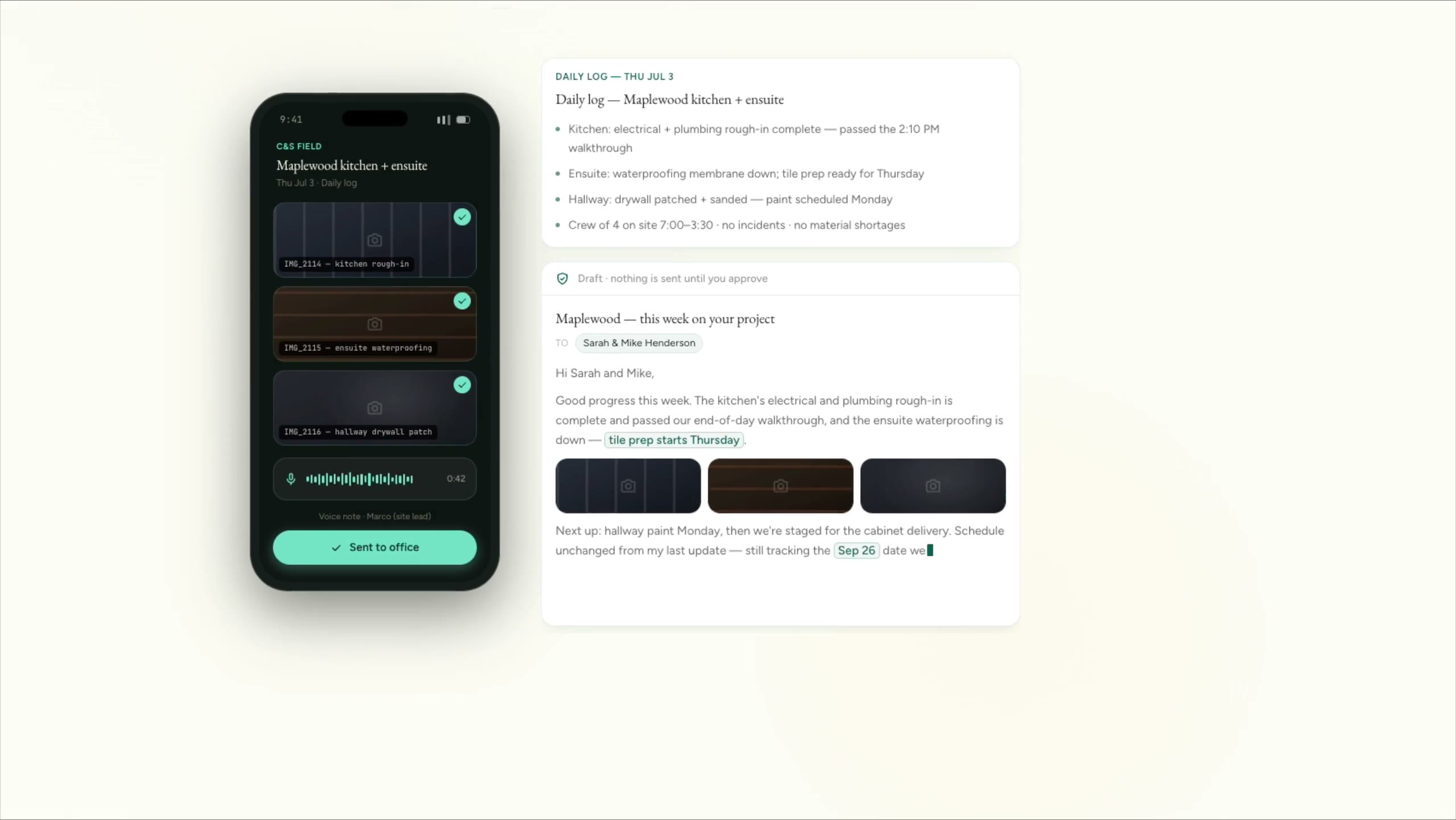
Cedar & Stone, renovation (fictional company)
Site photos and a voice note become a daily log and a client update. Nothing is retyped.
The companies are fictional. Every clip is a real screen recording of the same staged product, not a mockup.
How it actually runs
A typical renovation or contracting business runs on a job management tool like JobTread or Buildertrend, QuickBooks for the books, a shared inbox, photos on everyone’s phones, text threads with subtrades and a stack of paper tickets. Each tool now ships its own AI, and each one only sees its own slice. The money leaks in the gaps between them: a change agreed on site that never gets written up, a draw held because one document is missing, a client who hears about a delay last.
Built for
- Renovation and residential builders
- General contractors
- Specialist trades and subtrades
- Design-build and custom home builders
60%
of specialty contractors wrote down or wrote off change order revenue at least occasionally.
82%
of contractors waited more than 30 days to get paid in 2024.
Sound familiar?
- Change orders get agreed on site and never written up, so we eat the cost.
- A draw gets held up because one document is missing.
- I can’t tell which subtrade’s insurance or WCB clearance has lapsed.
- Clients text me at night asking where things are at.
- The job software, QuickBooks and the inbox all tell different stories.
A job, start to finish
The system does the chasing. A person decides.
Every step splits the two. The copying, reminding and drafting move to the system. Prices, approvals and anything sent in your name stay with your team.
- 01
Inquiry and site visit
The system does
- Captures the job details, photos and address, however the inquiry arrives
- Creates the customer and the job record
- Books the site visit and sends the client a reminder
A person decides
You decide which jobs are worth a visit.
- 02
Estimate and follow-up
The system does
- Files the measurements, photos and notes from the visit on the job
- Drafts the estimate letter from the prices you enter
- Follows up on the estimate until the client replies
A person decides
You price the job. AI never sets the number.
- 03
The build and its changes
The system does
- Turns crew photos and voice notes into a daily log
- Drafts a change order for each scope change, with photo backup and the price you set
- Sends it for the client’s signature once you’ve approved it, before the extra work starts
A person decides
You agree every change with the client before work goes ahead.
- 04
Client updates and close-out
The system does
- Drafts the weekly client update from the logs and photos
- Tracks the deficiency list to completion
- Reminds you when the holdback period ends and the release is due
A person decides
You approve every update and sign off the job with the client.
- 01
Bid and estimate
The system does
- Logs each bid with its drawings, closing date and who is pricing it
- Collects subtrade quotes against each scope
- Reminds the estimator as the closing date gets close
A person decides
Your estimator prices the job and decides what to bid.
- 02
Pre-construction and subtrades
The system does
- Tracks what each subtrade owes you: insurance certificates, WCB clearance letters and safety documents
- Flags certificates and clearance letters before they expire
- Shares the schedule with each subtrade
A person decides
Your project manager awards the subcontracts and sets the schedule.
- 03
On site
The system does
- Collects daily logs and photos from the site
- Logs each change order with who asked for it and why
- Drafts the owner’s progress report for review
A person decides
Your superintendent runs the site. Your PM approves every change order and report.
- 04
Progress draws and holdbacks
The system does
- Reminds you of each progress draw date and gathers the backup
- Tracks every draw as submitted, certified and paid
- Flags holdback release dates for you and your subtrades
A person decides
Your PM and bookkeeper prepare and submit each draw.
- 01
Bid requests
The system does
- Logs bid requests from general contractors with their closing dates
- Files the drawings and specs on each bid
- Follows up on the bids you’ve submitted
A person decides
You decide which bids to chase and set the price.
- 02
Award and onboarding
The system does
- Keeps your insurance certificate, WCB clearance letter and safety documents current
- Sends each general contractor the document pack they ask for
- Flags anything about to expire
A person decides
You write the safe work procedures and site safety plans.
- 03
On site
The system does
- Schedules your crews against jobs
- Collects time sheets, daily logs and photos
- Records each extra with who directed it and when, so it can become a change order
A person decides
Your foreman runs the work and confirms what was directed.
- 04
Billing and holdbacks
The system does
- Reminds you of each general contractor’s billing date
- Tracks every invoice as billed, approved and paid
- Flags holdback that’s due for release
A person decides
You prepare the progress billing and chase what’s owed.
More of it working
The companies are fictional. Every clip is a real screen recording of the same staged product, not a mockup.
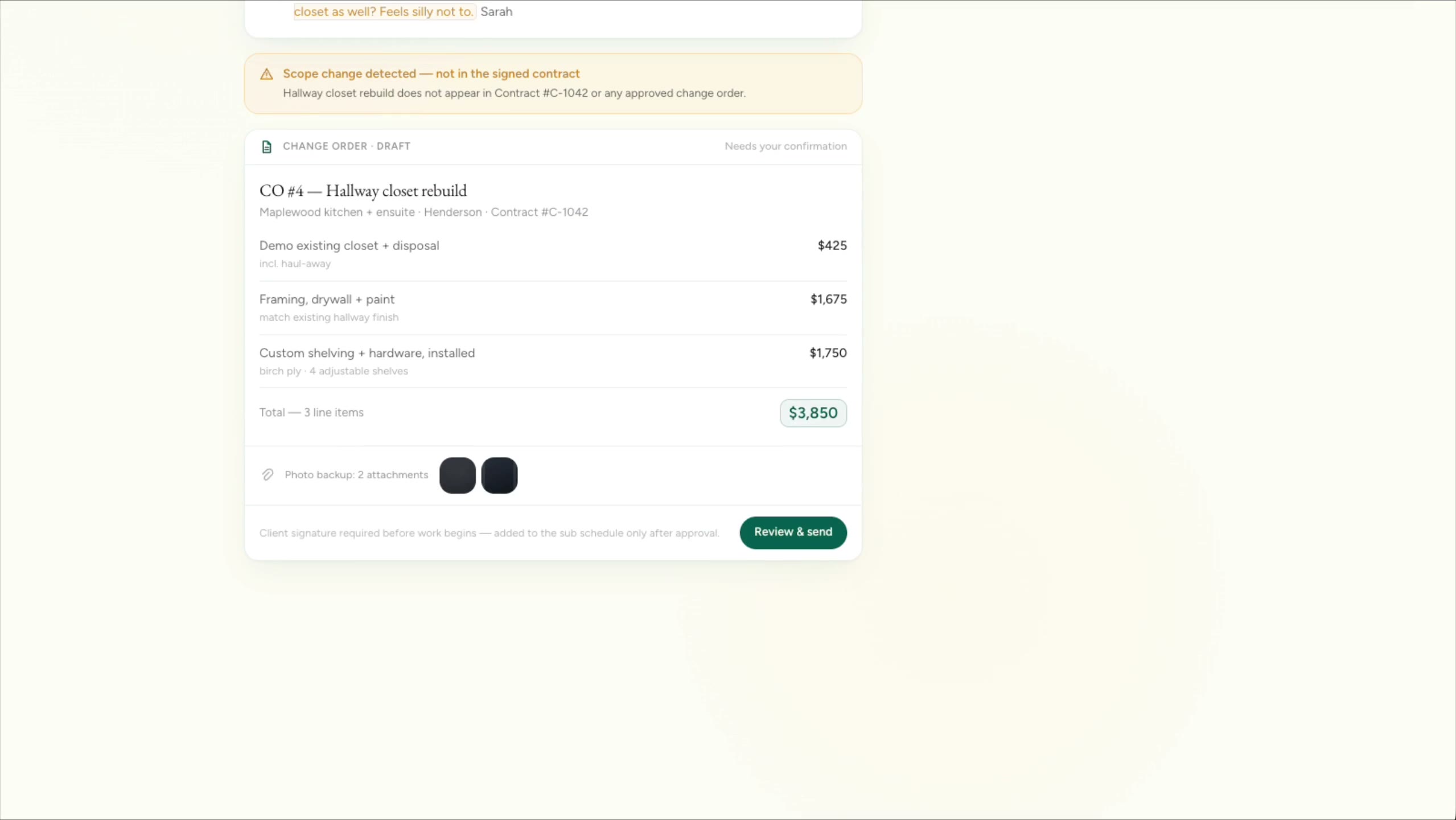
Cedar & Stone, renovation
A scope change is spotted in a client email and drafted as a change order with photo backup, waiting for approval.

Cedar & Stone, renovation
A cluttered inbox becomes three things that need you today, each with a reply drafted.
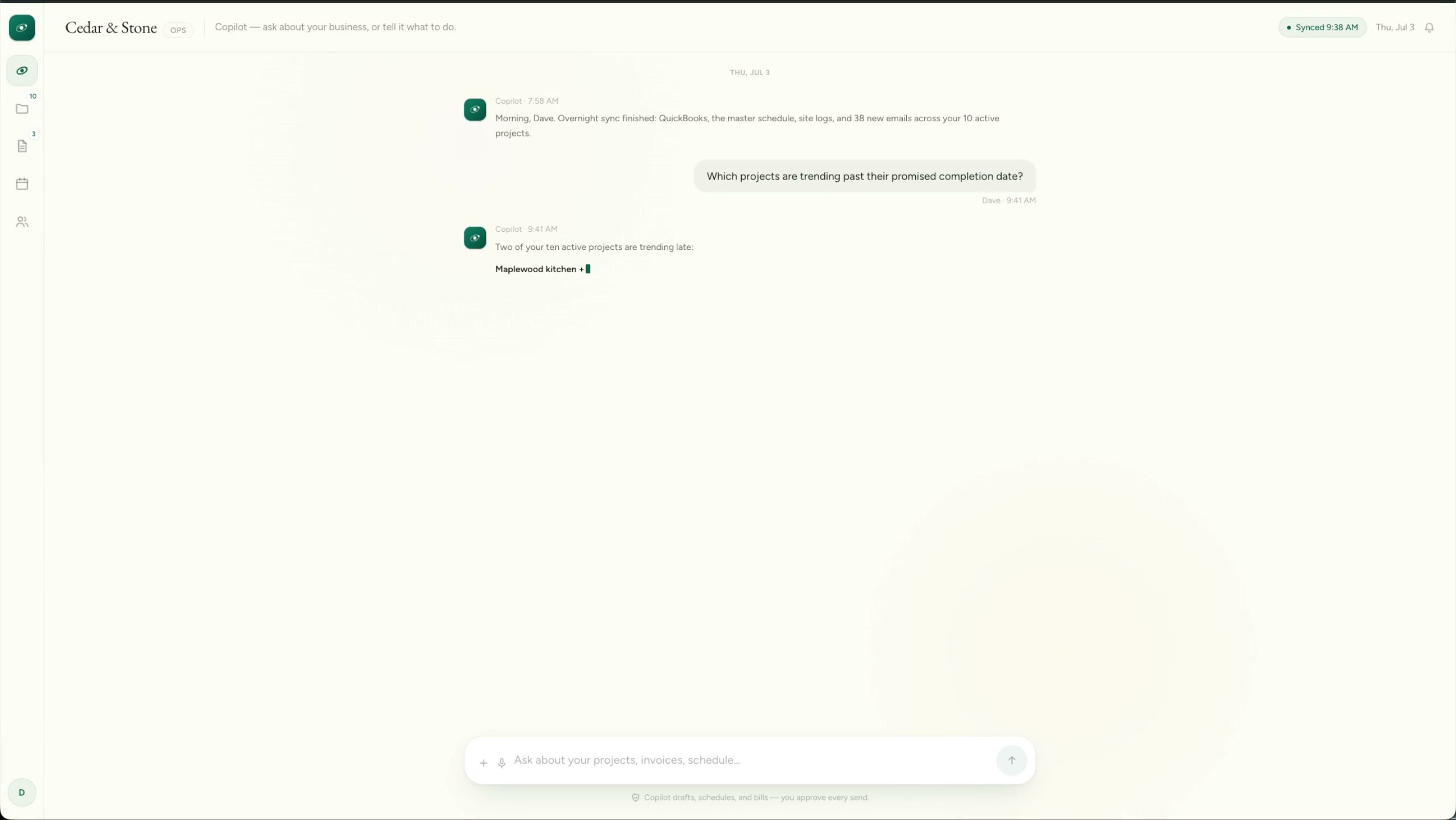
Cedar & Stone, renovation
Two projects slipping past their promised date are flagged, and a client update is drafted for review before it goes out.
1 / 3
What we’d build
Where we’d start
Each one links to the service behind it.
Quote requests and site visits
One inquiry form that collects job details, photos and the address up front, then books the site visit and sends the reminder.
Landing pages and booking flowsEstimate follow-up
Every estimate followed up until the client says yes, no or not yet. The sequence stops the moment they reply.
Follow-up and nurtureChange orders before the work
A scope change in an email, text or site note is drafted as a change order with photo backup, priced by you and signed by the client before the extra work starts.
AI drafting with approvalSubtrade documents
Insurance certificates and WCB clearance letters tracked for every subtrade, with a reminder before each one expires.
Workflow automationDaily logs from the field
Crews send photos and voice notes from site. The office gets a written daily log to check, filed on the job.
Field and mobile appsClient updates and a portal
Clients see the stage, photos, documents and any change order waiting for their signature. Weekly updates are drafted for your approval.
Client portalsDraws, holdbacks and owner reports
Draw dates, backup, holdback release dates and money owed in one live view, with owner progress reports drafted for a PM to approve.
Dashboards and reportingCalls answered while you’re on the tools
Inbound calls answered while everyone’s on site: job details taken, the site visit booked, urgent calls passed straight on.
Voice agents and call answeringAnswers from your own specs
A knowledge assistant over your specs, procedures and past jobs that shows the source for every answer.
Knowledge assistants for your team
Software you probably run
- JobTread
- Buildertrend
- Procore
- QuickBooks Online
- Sage 300 CRE
- CompanyCam
- Microsoft 365
- Google Workspace
- Excel
We connect to what you have. Names only; we aren’t partners of any of them.
Guide
JobTread’s AI Connector: what it can touch, and three checks before you trust a draft
What the connector can read, what it can change, and the three checks that make it safe to use for client reporting.
Facts checked 16 October 2026
Read the guideThe line we hold
What stays with you
- AI doesn’t price jobs. Every price, estimate and change order amount is set by a person.
- Safety and contract compliance stay with you, the contractor. The system reminds; it never signs off.
And in every industry, AI never does these alone:
- Move money, or promise it
- Send the first message to anyone in your name
- Set a price or a quote
- Make a legal commitment
- Answer a complaint
- Delete records or make bulk changes
- Make an exception to your own rules
Walk us through a typical job.
Five short steps. We’ll tell you honestly where a system would help, and where it wouldn’t.
Start a project