Industries
Trades, field services and installers
The van and the office working from the same job record.
Walk us through a job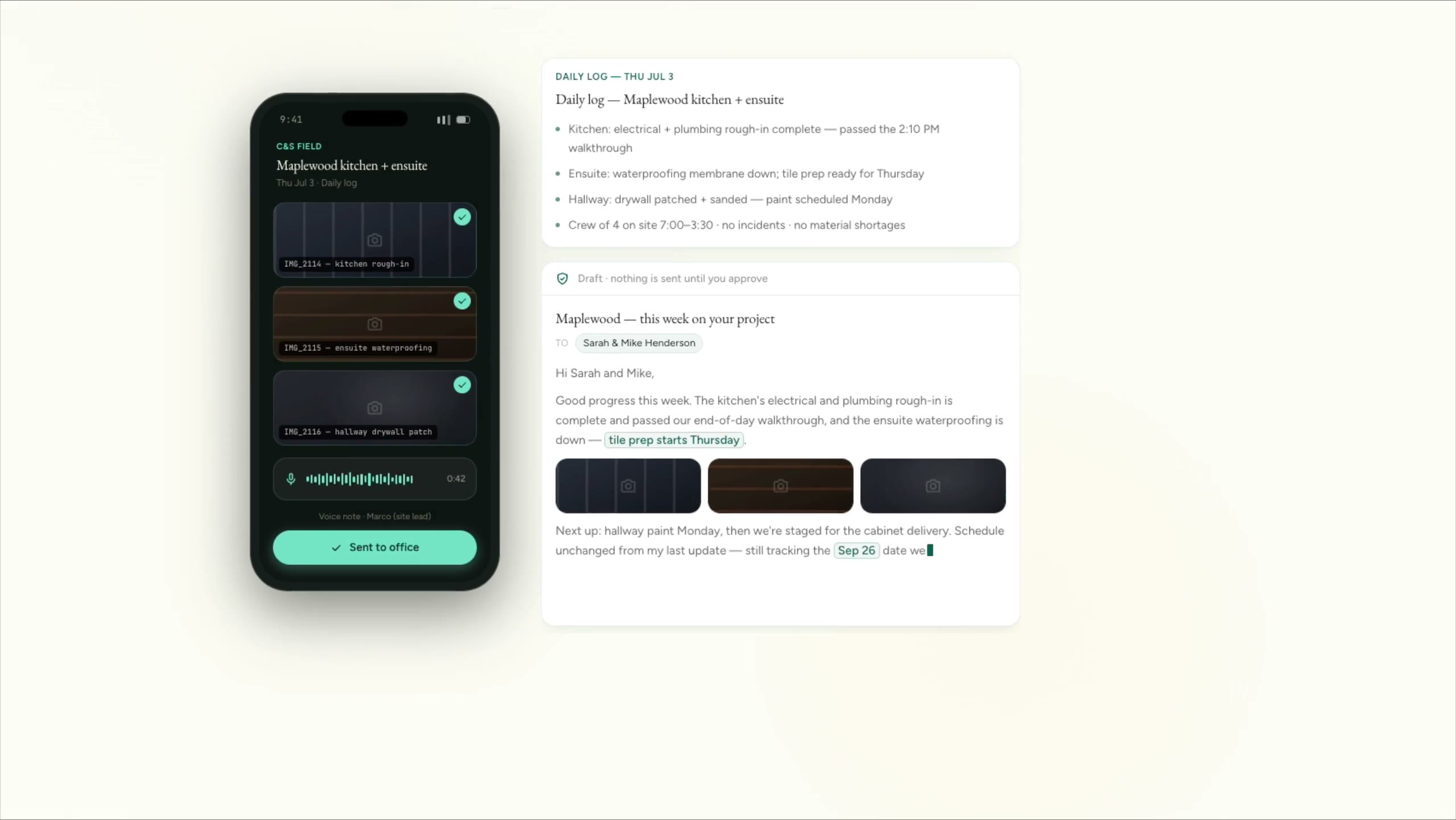
Cedar & Stone, renovation (fictional company)
Site photos and a voice note become a daily log and a client update. Nothing is retyped.
The companies are fictional. Every clip is a real screen recording of the same staged product, not a mockup.
How it actually runs
Trades and installers usually run on a field service tool like Jobber, Housecall Pro or ServiceTitan, QuickBooks for invoicing, a phone that never stops and photos on whichever device was handy. The tech knows what happened on site. The office finds out later, if the paperwork survives the drive back.
Built for
- Plumbing, heating and electrical
- HVAC, heat pump and solar installers
- Home services and maintenance
- EV charger and energy installers
Sound familiar?
- Quote follow-ups go out once and die in the inbox.
- We miss calls while we’re under a sink or up on a roof.
- The invoice never quite matches what the tech did.
- Permit and rebate paperwork falls through the cracks.
A job, start to finish
The system does the chasing. A person decides.
Every step splits the two. The copying, reminding and drafting move to the system. Prices, approvals and anything sent in your name stay with your team.
- 01
Call or inquiry
The system does
- Answers the call or message and takes the address, the problem and photos
- Creates the customer and the job
- Offers the next open slot
A person decides
Your office confirms the booking and anything unusual.
- 02
Dispatch
The system does
- Suggests the right tech by skill and area
- Texts the customer when the tech is on the way
- Puts the job history and equipment details on the tech’s phone
A person decides
Your dispatcher sets the day and changes it when plans change.
- 03
On site
The system does
- Collects photos, checklists and notes from the tech’s phone
- Turns a voice note into a job summary
- Drafts a quote for extra work from your price book
A person decides
Your tech recommends the work, and the customer agrees it on the spot.
- 04
Invoice and follow-up
The system does
- Drafts the invoice from what was actually done
- Asks for a review once the job is paid
- Sets the next service reminder
A person decides
Your office checks the invoice before it goes out.
What we’d build
Where we’d start
Each one links to the service behind it.
Calls answered on the job
Inbound calls answered while everyone’s on the tools: problem, address and photos taken, the visit booked, emergencies passed straight on.
Voice agents and call answeringA field app for techs
Job history, checklists, photos and notes on the tech’s phone, with entries saved when there’s no signal.
Field and mobile appsQuote follow-up and service reminders
Every quote followed up until the customer decides, and every installed system given its next service date.
Follow-up and nurturePaperwork that doesn’t stall
Permits, rebate applications, certificates and handover packs tracked per job, with a reminder before anything stalls.
Workflow automationInvoices that match the work
Invoices drafted from the job record and checked against the quote, so what was done and what’s billed agree.
Document and inbox processingOne view of the business
Calls, quotes won, open jobs and money owed in one live view.
Dashboards and reporting
Software you probably run
- Jobber
- Housecall Pro
- ServiceTitan
- QuickBooks Online
- Xero
- CompanyCam
- Google Calendar
- Excel
We connect to what you have. Names only; we aren’t partners of any of them.
The line we hold
What stays with you
- Diagnosis, pricing and safety calls stay with your qualified techs.
- Permits, certification and code compliance stay with your business.
And in every industry, AI never does these alone:
- Move money, or promise it
- Send the first message to anyone in your name
- Set a price or a quote
- Make a legal commitment
- Answer a complaint
- Delete records or make bulk changes
- Make an exception to your own rules
Walk us through a typical job.
Five short steps. We’ll tell you honestly where a system would help, and where it wouldn’t.
Start a project